
Why Headless UI Libraries matter in modern React
Modern frontend development has shifted heavily toward custom design systems. Teams no longer want off-the-shelf UI kits that dictate colors, spacing, and layout. Instead, they want full control over styling while still getting:
- Accessibility done right
- Predictable behavior
- Cross-browser consistency
- Composable APIs
This is where headless UI libraries come in.
A headless UI library focuses on logic, state management, accessibility, and interactions, while leaving styling entirely up to the developer. This approach works especially well with:
- Tailwind CSS
- Custom design systems
- shadcn-style component architectures
Rather than fighting predefined styles, developers can build exactly what they need without re-implementing complex behaviors like keyboard navigation, focus management, or ARIA roles.
The rise of Radix UI and Base UI
Among headless UI libraries in the React ecosystem, Radix UI and Base UI have gained significant attention but for different reasons.
Radix UI became popular by offering:
- Production-ready components
- Strong accessibility defaults
- A stable, well-documented API
- Minimal styling, but clear structure
Base UI, on the other hand, focuses on flexible, accessible components:
- Flexible rendering and composition
- Strong control over markup and styling
- Fewer assumptions about visual design and layout
- Designed for teams building custom component systems
Both libraries aim to solve similar problems, but they make very different trade-offs in terms of abstraction, control, and developer freedom.
What this blog covers (and why)
If you’re a developer choosing between Radix UI and Base UI, the real question usually isn’t “Which is better?” It’s:
Which one fits my project, team, and long-term goals?
In this blog, we’ll:
- Break down how Radix UI and Base UI differ at a conceptual level
- Compare their APIs, accessibility models, and developer experience
- Highlight real-world decision points instead of surface-level features
- Explain why we chose Base UI for Shadcn Space, based on actual constraints and requirements
By the end, you should have a clear understanding of:
- When Radix UI makes sense
- When Base UI is the better foundation
- Why Base UI aligns better with highly customizable systems like Shadcn Space
What is Radix UI?
Radix UI is an open-source, headless UI component library for React.
Its main goal is to help developers build accessible and high-quality UI components without having to deal with all the hard accessibility and interaction details themselves.
Radix UI addresses this by providing well-tested, accessible primitives that serve as the foundation of your design system.
Key Features
Radix UI focuses on making developers’ lives easier.
Unstyled
- No CSS included
- You control all styling
- Works well with Tailwind CSS
Open and customizable
- Components are split into parts (like Trigger, Content)
- You can wrap components
- You can add your own props, events, or refs
Uncontrolled by default
- You don’t need to manage state manually
- But you can control the state if needed
Great developer experience
- Fully typed TypeScript APIs
- Consistent patterns across components
- asChild prop lets you control the rendered HTML element
Accessibility Approach
Accessibility is the core strength of Radix UI.
- Follows WAI-ARIA design patterns
- Handles focus traps (e.g., inside dialogs)
- Supports keyboard interactions like Esc, Tab, and arrow keys
- Works well with screen readers
This means developers can build accessible UIs without deep accessibility knowledge.
The trade-off is that accessibility logic is closely tied to Radix’s component structure, which can sometimes limit custom layouts.
Typical Use Cases
Radix UI is ideal when you want accessible components quickly without building complex interaction logic yourself. It handles focus management, keyboard navigation, and ARIA patterns out of the box.
It works best for common UI patterns like dialogs, dropdowns, and tooltips, especially in dashboards or SaaS applications where stability and predictability matter.
Radix is also a strong choice if you want production-ready primitives and are building with shadcn/ui and Tailwind CSS, since it integrates seamlessly with that ecosystem.
What is Base UI?
Base UI is a headless UI library focused on flexibility and control.
While Radix UI gives you ready-made primitives, Base UI provides accessible components with flexible rendering and composition APIs, giving developers more control over the resulting markup, layout, and styling.
Base UI’s philosophy is:
Accessibility first, structure last.
It provides the logic needed for accessible interactions but leaves markup, layout, and styling entirely up to the developer.
Key Features
Base UI focuses on control and customization.
Flexible component structure
- Components provide sensible defaults
- You can customize how components are rendered
- You can compose components with your own elements and components
Flexible APIs
- Props like initialFocus and finalFocus
- Easy to integrate into custom systems
Tested across environments
- Browsers
- Devices
- Screen readers
- Platforms
Component Architecture
Base UI components are designed to be composed and customized. They provide accessible behavior and sensible defaults while allowing developers to control how components are rendered and combined with their own elements.
Example (conceptually):
- Radix UI → Provides established component parts and composition patterns.
- Base UI → Provides component behavior with flexible rendering and composition APIs.
This makes Base UI ideal for building custom design systems.
Accessibility Model
Base UI treats accessibility as a core priority while giving developers more control. It handles essential behaviors like keyboard navigation with Arrow keys, Enter, and Esc, manages focus automatically, and provides the necessary structure for accessible labels and form elements.
At the same time, developers are responsible for styling focus states such as :focus and :focus-visible, maintaining proper color contrast, and ensuring accessible names are provided where needed. This approach offers greater flexibility, but it requires stronger awareness and intentional implementation from the developer.
Typical Use Cases
Base UI works best when you are building a component registry platform or providing ready-to-copy code blocks. It’s especially useful when shipping animated and highly interactive components where users are expected to customize the markup and styling to fit their own design systems.
In these scenarios, flexibility matters more than predefined structures. Components must adapt to different styling setups, layouts, and branding systems. Base UI makes this easier by handling behavior and accessibility while leaving the structure and visual design fully in the developer’s control.
What’s changed in 2026?
The Radix UI vs Base UI decision has changed since this comparison was first published. In 2026, Base UI became the default component library for new shadcn/ui projects, while Radix UI continues to be fully supported.
This does not mean Radix UI has been replaced or deprecated. Existing projects built with Radix UI can continue using it without migrating. The change mainly affects the default starting point for new shadcn/ui projects.
Base UI is now the default for new shadcn/ui projects
For developers starting a new project with shadcn/ui, Base UI is now the default direction. This makes Base UI the natural choice if you want to follow the current shadcn/ui setup without explicitly selecting another component library.
Radix UI is still available, so developers can continue choosing it when their project, team, or existing component library is already based on Radix.
What does this mean for developers?
The decision can now be simplified:
- Starting a new shadcn/ui project: Base UI is the default choice.
- Already using Radix UI: There is no need to migrate just because Base UI is now the default.
- Building a new component system: Base UI is worth considering for its flexible composition and rendering APIs.
- Maintaining an existing Radix-based application: Continuing with Radix can be the most practical option.
The important point is that Base UI becoming the default does not make Radix UI obsolete. Both remain valid choices, but they now have different positions in the shadcn/ui ecosystem.
The Practical Takeaway
If you’re starting a new shadcn/ui project in 2026, Base UI is the natural starting point. If you already have a production application built with Radix UI, there is usually no reason to migrate unless Base UI provides a specific capability or workflow that your project needs.
Radix UI vs Base UI: Core Differences (with code)
Design Philosophy
Radix UI provides established component primitives with structured composition patterns.
Base UI provides accessible components with flexible rendering and composition APIs, giving you more control over how those components fit into your markup.
This difference becomes very clear in code.
Component Abstraction Level
Radix UI (Structured Components)
import * as Dialog from "@radix-ui/react-dialog";

function RadixDialog() {
  return (
    <Dialog.Root>
      <Dialog.Trigger>Open</Dialog.Trigger>

      <Dialog.Portal>
        <Dialog.Overlay className="overlay" />
        <Dialog.Content className="content">
          <Dialog.Title>Dialog title</Dialog.Title>
          <Dialog.Description>
            Dialog description
          </Dialog.Description>

          <Dialog.Close>Close</Dialog.Close>
        </Dialog.Content>
      </Dialog.Portal>
    </Dialog.Root>
  );
}
You:
- Follow Radix’s component tree
- Style the provided parts
- Get correct behavior automatically
Base UI (Behavior-First)
import { Dialog } from "@base-ui/react/dialog";

function BaseDialog() {
  return (
    <Dialog.Root>
      <Dialog.Trigger>Open</Dialog.Trigger>

      <Dialog.Popup className="content">
        <h2>Dialog title</h2>
        <p>Dialog description</p>

        <button>Close</button>
      </Dialog.Popup>
    </Dialog.Root>
  );
}
You:
- Use Base UI’s component primitives
- Customize the rendered elements when needed
- Control the layout and styling
- Compose Base UI components with your own components
Styling Flexibility
Radix UI
- Styling is flexible
- Components follow established composition patterns
- You style the provided parts such as Overlay and Content
<Dialog.Content className="rounded-lg shadow-lg" />Base UI
- Styling is flexible
- Components provide flexible rendering options
- You can compose components with custom elements
<Dialog.Popup className="grid gap-4 rounded-xl shadow-lg" />With Base UI, you’re not constrained by predefined pieces.
Customization Control
Example scenario ( Dialog Close Customization ):
Both libraries provide a built-in way to render a close button inside a dialog. The difference is how much control you get over that close behavior.
Radix UI – Boolean close Pattern

Using Radix UI, closing is typically handled via a dedicated Dialog.Close component or a simple boolean-driven prop pattern in wrapped abstractions.
Example
<DialogContent close />Here:
- close → boolean
- When true, a default close button is rendered
- Limited configuration options
- Styling usually handled externally
What This Means
The close functionality is:
- Opinionated
- Pre-structured
- Minimal API surface
If you need custom rendering logic, advanced styling, or dynamic behavior, you often move away from the built-in close and implement custom logic manually.
Base UI – Object-Based close Control
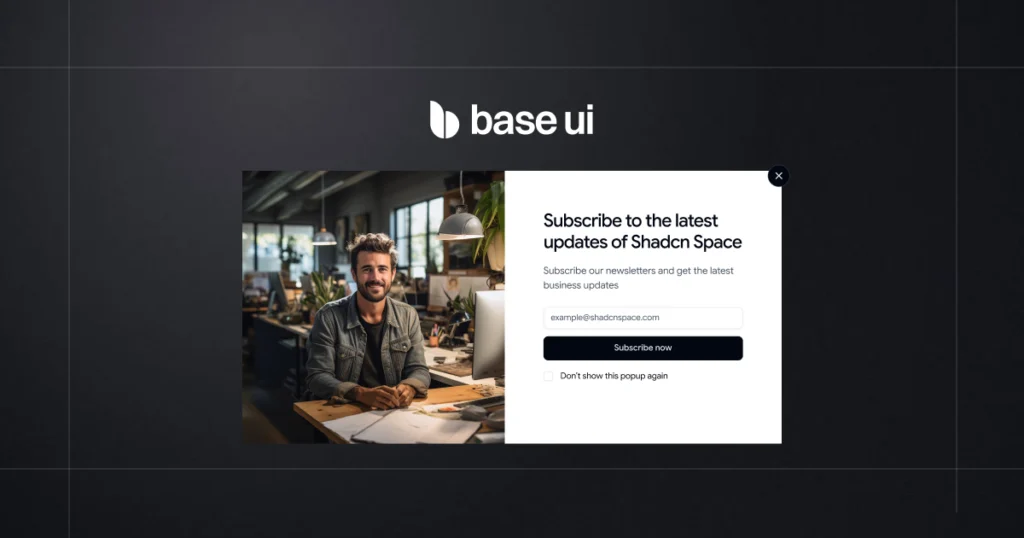
With Base UI, the close prop accepts an object.
Example
<DialogContent
  close={{
    nativeButton: true,
    className: "absolute top-4 right-4",
    style: { color: "red" },
    render: (props) => <MyCustomIcon {...props} />
  }}
/>
Available Options :
| Property | Type | Purpose |
|---|---|---|
| nativeButton | boolean | Use native <button> element |
| className | string | function | Fully customize styling |
| style | React.CSSProperties | function | Inline style control |
| render | ReactElement | function | Replace default rendering |
Direct Comparison:
| Feature | Radix UI | Base UI |
|---|---|---|
| Simple enable/disable | Boolean | Object |
| Styling control | Limited | Full |
| Replace rendering | Manual workaround | Built-in |
| Dynamic styling logic | External | Supported |
| Native element control | Indirect | Explicit |
The Practical Difference
Radix
You enable a close button.
Customization requires additional structure or overrides.
Base UI
You configure the close button.
The API is designed for deep customization from day one.
Why This Matters
As your component library grows:
- Boolean APIs are simple but rigid.
- Object-based APIs scale better.
- Advanced design systems benefit from configuration-driven control.
Base UI gives developers control without needing to break the abstraction layer.
Animation & Transitions
Radix UI
Uses data-state attributes:
# Need to add styles
[data-state="open"] {
  animation: fadeIn 200ms ease;
}
Base UI
No animation assumptions – works with anything:
# Just using Tailwindcss class
<Dialog.Popup className="animate-scale-in" />
Base UI fits better when:
- Animations are complex
- You use motion libraries
- Layout changes dynamically
Learning Curve
Radix UI
- Easier to start
- Clear mental model
- Faster initial setup
Base UI
- Takes longer to learn
- Requires system-level thinking
- Pays off as complexity grows
Developer Experience Comparison
Developer experience (DX) is not just about documentation or TypeScript types – it’s about how much friction you feel while building and maintaining UI.
Let’s break that down.
API Design
Radix UI
- APIs are consistent across components
- Components follow a predictable pattern (Root, Trigger, Content)
- Easy to remember once you learn one component
Example mindset:
“If you know how Dialog works, you already know how Dropdown or Tooltip works.”
Base UI
- APIs are more flexible and less opinionated
- Fewer assumptions about how components should be structured
- Feels closer to working with hooks and primitives
Example mindset:
“I get the tools, and I decide how to use them.”
Composition Patterns: asChild vs render
One of the noticeable differences when working with Radix UI and Base UI is how components are composed with other elements.
Both libraries allow you to control the element a component renders, but they use different APIs.
Radix UI: asChild
Radix UI commonly uses the asChild prop to let you replace the component’s default rendered element with your own element.
For example:
<Dialog.Trigger asChild>
  <button>Open dialog</button>
</Dialog.Trigger>
The component’s behavior is preserved while the trigger is rendered using the child element.
This pattern is widely used in Radix-based shadcn/ui components and is familiar to developers who have worked with the Radix ecosystem.
Base UI: render
Base UI uses the render prop for composition and controlling how a component is rendered.
For example:
<Dialog.Trigger render={<button />}>
  Open dialog
</Dialog.Trigger>
You can also use another component:
<Button render={<Link href="/pricing" />}>
  View pricing
</Button>
This gives you control over the rendered element while keeping the component’s behavior and accessibility features.
What is the difference?
The goal is similar, but the API is different:
| Radix UI | Base UI | |
|---|---|---|
| Composition API | asChild | render |
| Main purpose | Replace the rendered element | Customize the rendered element |
| Common pattern | Child element | render prop |
| shadcn/ui usage | Widely used in Radix-based components | Used in Base UI-based components |
This difference is particularly important when moving components between Radix UI and Base UI. You should not assume that a Radix component can be switched to Base UI simply by changing the package import. Component APIs and composition patterns may also need to be updated.
Which approach is better?
Neither approach is universally better. The important difference is the API and how your component system is structured.
If you’re already using Radix UI, asChild is a well-established pattern and there is usually no reason to change it.
For a new project using Base UI, the render API is the approach you should learn and use.
TypeScript Support
Radix UI
- Excellent TypeScript support
- Fully typed APIs
- Very reliable autocomplete and error checking
Base UI
- Strong TypeScript support
- Types are flexible to support custom composition
- Slightly more responsibility on the developer
For most teams, both libraries offer a solid TypeScript experience.
Integration with Tailwind & shadcn-style systems
Radix UI
- Works extremely well with Tailwind CSS
- Great fit for shadcn-style components
- Structure aligns with copy-paste component patterns
Base UI
- Ideal for building component registries
- Easier to expose raw markup and logic
- Better for animated and customizable code blocks
If your goal is to provide highly customizable components that users adapt to their own projects, Base UI fits more naturally.
Developer experience summary
| Area | Radix UI | Base UI |
| Composition | Slot-based | Free-form |
| State Control | Easy defaults | Explicit control |
| TypeScript | Excellent | Excellent |
| API Style | Consistent & structured | Flexible & low-level |
| Best Fit | App development | Design systems & registries |
When to choose Radix UI
Radix UI works best when you want strong defaults, predictable behavior, and ready-made accessibility without spending time designing your own component logic.
Ideal Project Scenarios
You should strongly consider Radix UI if:
- You want accessible components out of the box
Radix handles keyboard navigation, focus management, and ARIA roles for you. You don’t need to be an accessibility expert to build correct components. - You are building a product UI, not a UI system
For dashboards, admin panels, SaaS apps, and internal tools, Radix helps you move fast. - You want proven, production-tested primitives
Radix has been used in many real-world projects and edge cases are already handled. - Your team prefers clear, stable APIs
The component APIs are consistent and unlikely to change suddenly. - You plan to pair it with Tailwind or shadcn-style components
Radix works very well as the “logic layer” behind styled components.
Example projects:
- SaaS dashboards
- Admin panels
- Internal tools
- MVPs and startup products
- Design systems that prioritize stability
Pros and Cons Summary
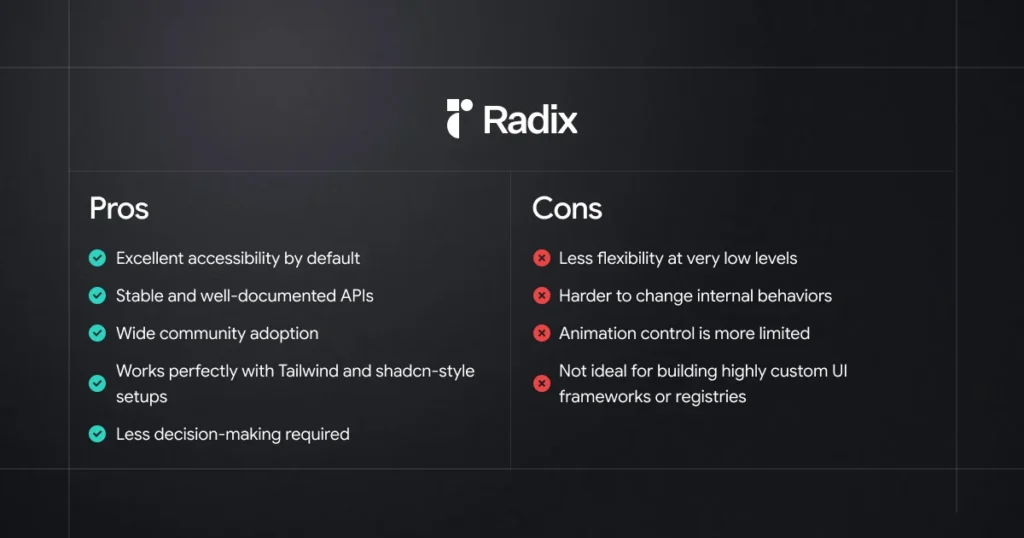
In simple terms
If your goal is to build a product quickly and safely, Radix UI is usually the better choice.
It gives you:
“Good defaults, fewer decisions, and fewer bugs.”
When to choose Base UI
Base UI isn’t trying to be the best choice for every project.
It shines when flexibility, control, and customization matter more than ready-made behavior.
Ideal Project Scenarios
Choose Base UI if you are building:
1. Component Registry Platforms
Platforms like Shadcn Space that:
- Provide copy-pasteable UI components
- Share full component code, not just APIs
- Expect developers to edit structure, logic, and styles
- Offer animated components and layout blocks
Base UI works great because it does not hide logic behind heavy abstractions.
2. Websites that use UI blocks from multiple registries
This is a big one
If your website:
- Uses UI blocks from different registries
- Copies components from open-source libraries
- Mixes layouts, sections, and interactions
- Needs to adapt third-party code quickly
Base UI lets you fully control the copied code without fighting the library.
You’re not locked into:
- Strict component APIs
- Hidden internal logic
- Opinionated structure
Instead, you get plain, understandable React code.
3. Design systems with heavy customization
Best when:
- Your design system changes often
- You customize markup and behavior per project
- You want consistent patterns, not rigid components
Base UI gives you the freedom to reshape components as your system evolves.
4. Animation-First Interfaces
Perfect if:
- Animations are part of the brand identity
- You use Framer Motion or CSS animations
- You need full control over transitions and timing
Base UI keeps animations outside the component logic, where they belong.
5. Teams that want ownership over code
Great for teams that:
- Want to understand every line of UI code
- Prefer composition over configuration
- Don’t want vendor lock-in
- Value long-term maintainability
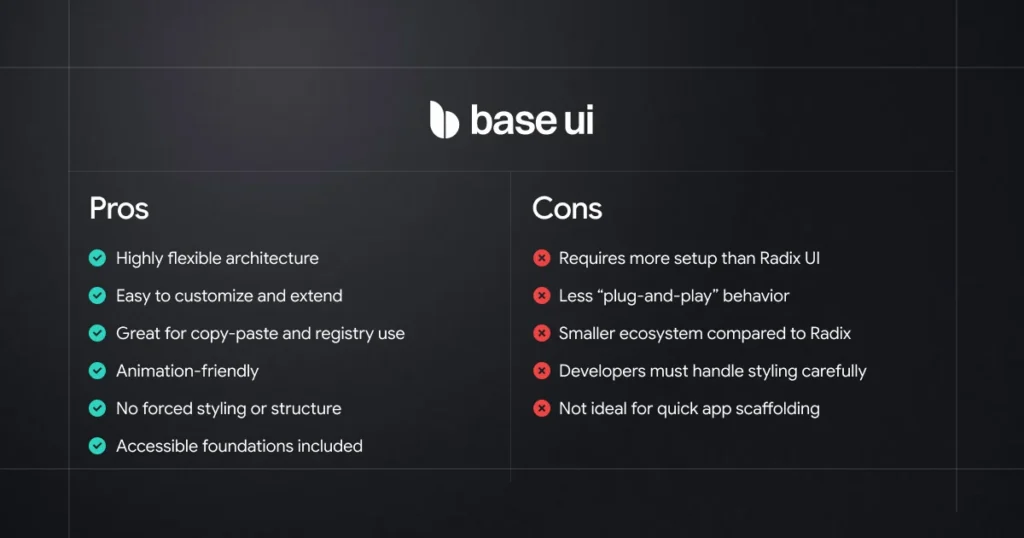
In one line
If your product consumes UI blocks from registries and needs full control,
Base UI is the better foundation.
Pros and Cons Summary
Can You Migrate from Radix UI to Base UI?
Yes. You can migrate an existing Radix UI project to Base UI, but it is not simply a matter of replacing the package. Radix UI and Base UI use different component APIs and composition patterns, so some components may require changes during the migration.
For example, Radix UI commonly uses the asChild pattern, while Base UI uses the render prop for composition. Other component APIs may also differ depending on the components used in your project.
Do You Need to Migrate?
If your existing Radix UI project is working well, there is no need to migrate just because Base UI is now the default for new shadcn/ui projects.
Migration makes more sense when you are starting a major UI rewrite, want to adopt Base UI’s component model, or have a specific requirement that fits better with Base UI.
Migration Guide
If you decide to migrate, Shadcn Space provides a dedicated step-by-step migration guide covering the changes required when moving from Radix UI to Base UI.
Read the Radix UI to Base UI Migration Guide →
The guide walks through the migration process and the API differences you need to consider, so you can use it as a practical reference instead of making changes throughout your project without a clear migration path.
Where does React Aria fit?
The shadcn/ui ecosystem is no longer limited to Radix UI and Base UI. In 2026, React Aria also became a first-class component base in shadcn/ui.
React Aria is developed by Adobe and provides accessible React components and interaction patterns with a strong focus on keyboard navigation, screen readers, and other accessibility requirements.
React Aria vs Radix UI and Base UI
React Aria takes a different approach from simply being another alternative to Radix UI and Base UI. Its component system puts a strong emphasis on accessible interactions and behavior, while giving developers control over styling and presentation.
shadcn/ui now supports all three bases:
| Component Base | Position in shadcn/ui |
|---|---|
| Base UI | Default for new projects |
| Radix UI | Fully supported and mature |
| React Aria | Supported alternative with a strong accessibility focus |
You can choose React Aria when initializing a new shadcn/ui project:
pnpm dlx shadcn@latest init --base ariaThe shadcn/ui CLI then installs the React Aria implementation when you add supported components.
Should you choose React Aria?
React Aria is worth considering if accessibility and interaction behavior are especially important to your application or design system.
However, if you’re specifically deciding between Radix UI and Base UI for a shadcn/ui project, React Aria doesn’t necessarily change that decision.
For most new shadcn/ui projects, Base UI remains the default starting point. Radix UI remains a strong choice for existing projects, while React Aria provides another option when its accessibility and component model better fit your requirements.
The important takeaway is that shadcn/ui now lets developers choose the component foundation that best fits their project instead of being tied to a single library.
What do we use in Shadcn Space?
Since this article compares Radix UI and Base UI, it’s worth mentioning how we use them in Shadcn Space.
Shadcn Space supports both Base UI and Radix UI, giving developers the flexibility to use components that match their project and existing component architecture.
Our newer components and UI blocks are built with Base UI, while Radix UI-based components and blocks are also available for developers who already use Radix UI or prefer its established component APIs.
This approach means you don’t need to switch component libraries just to use Shadcn Space. Whether you’re starting a new project with Base UI or working on an existing Radix UI project, you can find components that fit your setup.
If you want to see how these implementations look in real projects, you can explore them here:
All blocks are designed to be copied into your project, understood, and customized to fit your application’s needs.
Final Thoughts
Radix UI, Base UI, and React Aria are all strong foundations for building modern React interfaces, but they approach component design, composition, and accessibility in different ways.
Radix UI provides mature, accessible primitives with established APIs, making it a strong choice for existing applications and teams already working with the Radix ecosystem.
Base UI provides flexible composition and rendering patterns and is now the default foundation for new shadcn/ui projects. This makes it a natural starting point for developers building new applications with shadcn/ui.
React Aria provides another option for developers who want a strong focus on accessible interactions and behavior. It is now also supported as a component base in the shadcn/ui ecosystem.
This doesn’t mean existing Radix UI projects need to migrate. If your application is already working well with Radix UI, continuing with Radix is a perfectly valid choice. Similarly, the best choice for a new project depends on your component requirements, workflow, and the level of control you need.
At Shadcn Space, we support both Radix UI and Base UI, so you can choose components that fit your project’s requirements and existing architecture.
If you’re considering moving an existing project from Radix UI to Base UI, check out our step-by-step migration guide.
In the end, there isn’t a single component library that is right for every project. For a new shadcn/ui project, Base UI is the natural default, while Radix UI and React Aria remain valuable choices depending on your existing setup and project requirements.
Leave a Reply